User Story #598
closedFeature #533: Authentication Hum Rahi
EPIC #597: Epic: E2.3 — Citizen Report Status Tracking
US-025 · Citizen Views All Submitted Reports with Current Status
100%
Description
📖 Story
As Rahul (a citizen), I want to see all my previously submitted incident reports in one place with their current status, so that I know which issues are being addressed and which still need attention — without calling anyone.
🎯 Goal & Context
This is the primary post-submission touchpoint for the citizen. After filing a report, Rahul's next natural question is "What happened to it?" This screen answers that. It must feel lightweight, scannable, and trustworthy. Status accuracy directly impacts citizen confidence in the app.
✅ In-Scope
- Paginated/scrollable list of all reports submitted by the logged-in user
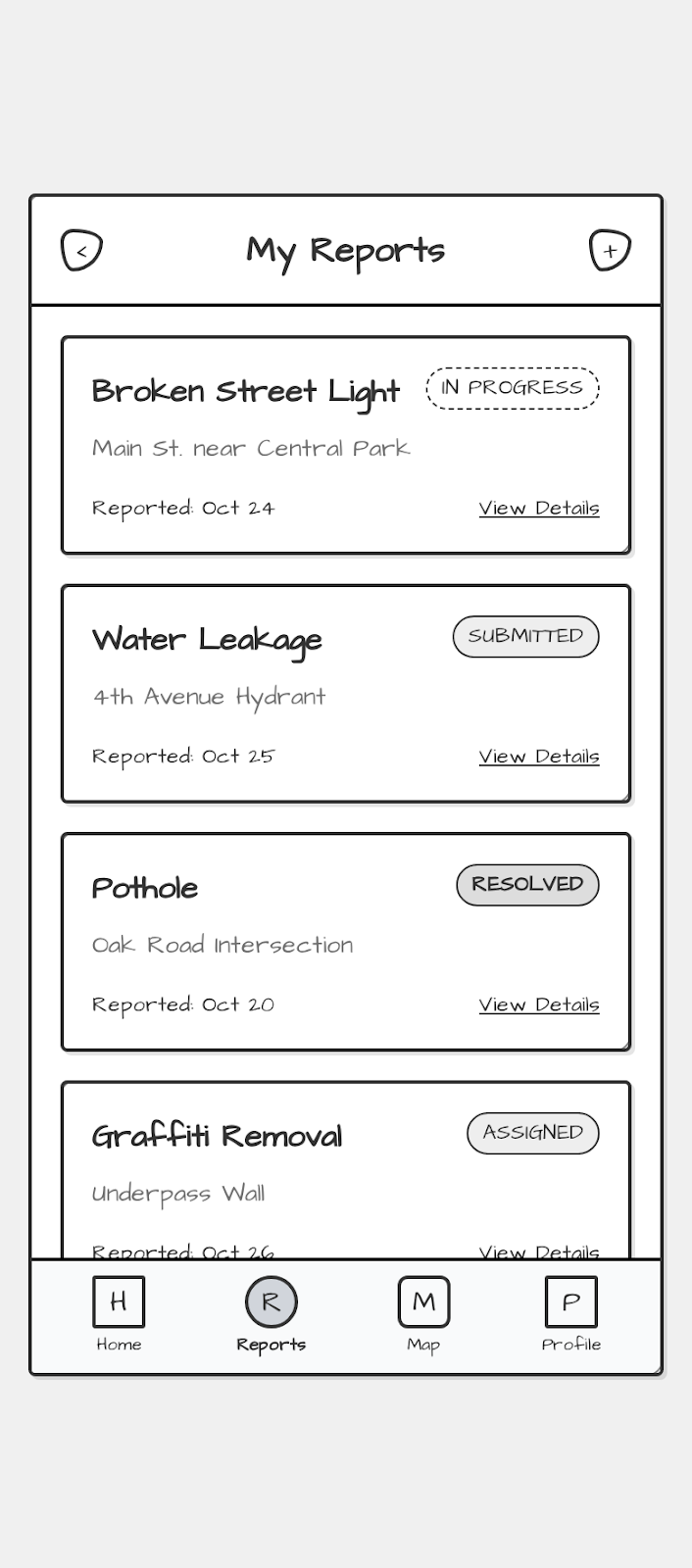
- Each card shows: title, category, location, reported date, current status
- Status badge with visual differentiation per status type
- "View Details" deep link per report
- Bottom navigation bar (Reports tab active)
- Empty state when no reports exist
- Pull-to-refresh gesture support
❌ Out-of-Scope
- Editing or withdrawing a report from this screen
- Filtering / sorting (separate story — filter icon is a placeholder per wireframe)
- Push notification trigger (separate story)
- Admin-side status updates (backend story)
🎨 Design Guidance (for Designer + Frontend Engineer)
Reference Wireframe Breakdown
Based on the provided low-fi wireframe, implement the following component hierarchy:
<MyReportsDashboard>
  ├── <AppHeader>            → Back icon | "My Reports" title | Filter icon (disabled/placeholder)
  ├── <ReportList>           → Scrollable container
  │     └── <ReportCard>     → Repeated per report item
  │           ├── Title + StatusBadge (top row)
  │           ├── LocationText
  │           └── ReportedDate + "View Details" CTA
  └── <BottomNavBar>         → Home | Reports (active) | Map | Profile
Status Badge Visual Spec
| Status | Label | Visual Treatment |
|---|---|---|
SUBMITTED |
Submitted | Outlined, neutral grey, no fill |
ASSIGNED |
Assigned | Outlined, amber/yellow tint |
IN_PROGRESS |
In Progress | Dashed border, blue tint |
RESOLVED |
Resolved | Solid fill, green tint, bold |
REJECTED |
Rejected | Solid fill, red tint |
⚠️ Design Note: Do not rely on color alone — pair every status with an icon or text label for accessibility (WCAG 2.1 AA).
Card Layout Rules
- Card width: full container width minus 16px padding each side
- Min card height: 100px (avoid cramped feel on short content)
- "View Details" must look tappable — underline + sufficient tap target (min 44×44px)
- Location text: subdued (opacity ~65%), max 1 line, ellipsis overflow
- Date format:
DD MMM(e.g.,24 Oct) — do not show year unless it differs from current year
Empty State (required, not in wireframe)
When reports.length === 0:
- Illustration placeholder (hand-drawn style matching wireframe aesthetic)
- Heading: "No reports yet"
- Body: "Tap the + button on Home to report your first incident."
- CTA button: "Go to Home" → navigates to Home tab
Loading State
- Show skeleton cards (3 shimmer placeholders) while API fetch is in flight
- Do NOT show a full-screen spinner — skeleton maintains layout stability
🖥️ Frontend Implementation Guidance
Component File Structure
/features/my-reports/
  ├── MyReportsDashboard.tsx       ← Page-level component
  ├── ReportCard.tsx               ← Individual card (pure/presentational)
  ├── StatusBadge.tsx              ← Reusable badge component
  ├── ReportListSkeleton.tsx       ← Loading placeholder
  ├── EmptyReportsState.tsx        ← Zero-data state
  ├── useMyReports.ts              ← Data fetching hook
  └── myReports.types.ts           ← TypeScript interfaces
TypeScript Interface
// myReports.types.ts

export type ReportStatus =
  | 'SUBMITTED'
  | 'ASSIGNED'
  | 'IN_PROGRESS'
  | 'RESOLVED'
  | 'REJECTED';

export interface ReportSummary {
  id: string;                    // UUID
  title: string;                 // e.g., "Broken Street Light"
  category: string;              // e.g., "Streetlight Fault"
  location: string;              // Short address / landmark
  status: ReportStatus;
  reportedAt: string;            // ISO 8601
  updatedAt: string;             // ISO 8601 — for "last updated" display
  thumbnailUrl?: string;         // Optional — photo thumbnail
}

export interface MyReportsResponse {
  data: ReportSummary[];
  total: number;
  page: number;
  pageSize: number;
}
Data Fetching Hook
// useMyReports.ts
const useMyReports = () => {
  const [reports, setReports] = useState<ReportSummary[]>([]);
  const [status, setStatus] = useState<'idle' | 'loading' | 'error' | 'success'>('idle');

  const fetchReports = async (page = 1) => {
    setStatus('loading');
    try {
      const res = await api.get<MyReportsResponse>(`/citizen/reports?page=${page}&pageSize=20`);
      setReports(prev => page === 1 ? res.data.data : [...prev, ...res.data.data]);
      setStatus('success');
    } catch {
      setStatus('error');
    }
  };

  useEffect(() => { fetchReports(); }, []);
  return { reports, status, refresh: () => fetchReports(1) };
};
API Contract (Frontend → Backend)
GET /api/v1/citizen/reports
Authorization: Bearer <token>
Query params:
  page      (default: 1)
  pageSize  (default: 20)
  status    (optional filter: SUBMITTED | IN_PROGRESS | RESOLVED ...)

Response 200:
{
  "data": [ ...ReportSummary[] ],
  "total": 42,
  "page": 1,
  "pageSize": 20
}

Response 401: Token expired → redirect to Login
Response 404: No reports found → render EmptyState (not an error)
Navigation & Routing
| Action | Behavior |
|---|---|
| Tap "View Details" | Navigate to /reports/:id (Report Detail Screen) |
Tap back <
|
Navigate to previous screen in stack |
| Tap "Reports" nav tab | No-op if already active; scroll list to top |
| Tap "Home" nav tab | Navigate to Home screen |
| Tap "Map" nav tab | Navigate to Map view |
| Tap "Profile" nav tab | Navigate to Profile screen |
Infinite Scroll / Pagination
- Load first 20 records on mount
- When user scrolls to within 200px of list bottom, automatically fetch next page (
page + 1) - Append new cards to existing list (no full re-render)
- Show a small inline loader at bottom during next-page fetch
- When all records loaded, show:
"You've seen all your reports"at the bottom
Pull-to-Refresh
- On downward overscroll gesture: trigger
refresh()from hook (re-fetch page 1, replace list) - Show a subtle loading indicator during refresh
- On success: briefly show a toast
"Reports updated"(auto-dismiss 2s)
♿ Accessibility Requirements
- All status badges must have
aria-label(e.g.,aria-label="Status: In Progress") - Report cards must be keyboard-navigable (tab order)
- "View Details" links must have descriptive
aria-label:"View details for Broken Street Light" - Minimum tap target: 44×44px for all interactive elements
- Color contrast ratio: ≥ 4.5:1 for all text (WCAG AA)
- Screen reader should announce:
"Report list, 4 items"on load
📏 Acceptance Criteria
| # | Criteria | Test Method |
|---|---|---|
| AC-1 | All reports submitted by the logged-in citizen are displayed, sorted by reportedAt descending (most recent first) |
Manual + API test |
| AC-2 | Each card displays: title, location, reported date, and correct status badge | Visual QA |
| AC-3 | Status badge visually matches the spec table above for all 5 status types | Design QA |
| AC-4 | "View Details" navigates to the correct Report Detail screen for that report.id
|
Manual |
| AC-5 | Empty state is shown when the user has zero reports | Manual |
| AC-6 | Skeleton loading state appears while data is fetching | Manual |
| AC-7 | Pull-to-refresh updates the list with latest data from the API | Manual |
| AC-8 | Reports tab is visually active in the bottom nav | Visual QA |
| AC-9 | List handles 50+ reports without UI freeze (pagination/infinite scroll works) | Performance test |
| AC-10 | Screen is accessible — passes Lighthouse Accessibility score ≥ 90 | Automated |
🔗 Dependencies & Open Questions
| # | Question | Owner | Status |
|---|---|---|---|
| 1 | Should the filter icon (top-right) be completely hidden or greyed out/disabled in this sprint? | PM (Rahul) | Open |
| 2 | Do we show a photo thumbnail on the card? (Not in wireframe, but improves scannability) | Design | Open |
| 3 | What is the sort order — reported date DESC or last updated DESC? | PM (Rahul) | Open |
| 4 | Is there a maximum number of reports a citizen can have? (impacts pagination design) | Backend | Open |
| 5 | Should REJECTED status be shown, or are rejected reports hidden from the citizen view? |
PM (Rahul) | Open — needs policy decision |
✅ Definition of Done
- All 10 ACs pass QA sign-off
- Design reviewed against wireframe — no deviations without PM approval
-
Unit tests for
useMyReportshook (loading, success, error, empty states) -
Component tests for
StatusBadgecovering all 5 status variants - Lighthouse Accessibility score ≥ 90 on the screen
- No hardcoded strings — all labels via i18n keys
- Skeleton, empty state, and error state all implemented and reviewed
-
thumbnailUrlgracefully degrades if missing (no broken image icons)
Files